Software for Language Tutors: How to Choose the Right Tool for Scheduling, Lesson Packages, and Homework
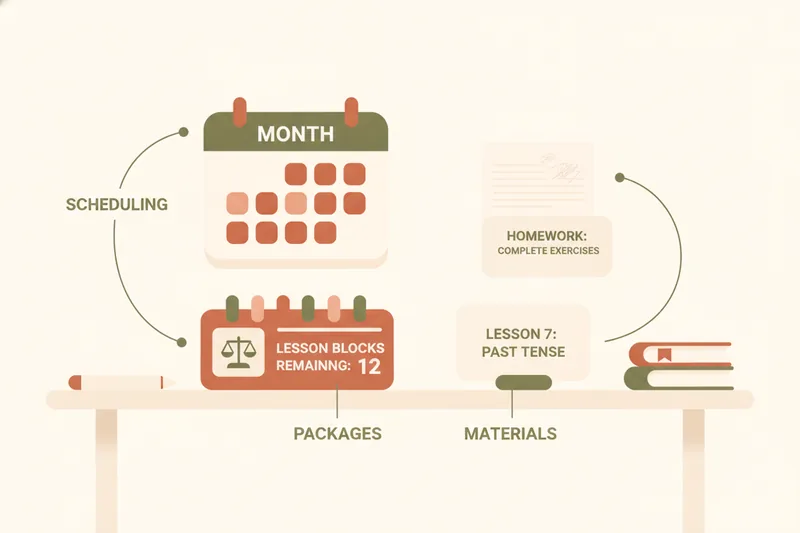
Software for tutors is a workspace that keeps three jobs tied together: booking and rescheduling lessons, tracking what each student has paid for and how many lessons remain, and attaching homework and materials to the lesson they belong to. For a language teacher running one-to-one lessons, small groups or exam-prep courses, the alternative is a calendar app, a payments spreadsheet and a chat thread that never quite agree with each other.
What tutoring software actually does for a language teacher
Independent tutors, marketplace-matched tutors, subscription-based schools and hybrids of the two all face the same coordination problem, whichever business model they run. Sometimes this category gets called tutoring business management software, but the label matters less than whether it actually links the three jobs above: when a lesson moves, the student sees the new time; when a lesson is paid for, the balance updates; when homework is assigned, it sits where the student will look for it, next to the lesson it belongs to.
That linking is what separates tutoring software from a generic scheduler or an invoicing tool used alongside one. A scheduler alone won't tell you how many lessons a student has left to book. An invoicing tool alone won't know which worksheet belongs to which lesson. The real test for any option is whether scheduling, lesson-package balances and homework read from the same record, or whether you're still stitching them together by hand.
Key features that keep scheduling, packages, and homework linked
Four capabilities decide whether software for tutors removes the manual work or just relocates it.
Lesson-package balance tracking should show, per student, how many lessons they've paid for and how many are left, updating as lessons happen rather than needing a separate recalculation. Good tools also support lesson packages with an optional expiry, so a discounted block of prepaid lessons doesn't need tracking in a notebook.
Homework and materials should attach to the specific lesson they're for, with a visible status, so a student can see what's due, reviewed or overdue this week without digging through chat history. Assignment timing matters too: some tools release homework the moment it's assigned, others tie release to when the session happens, and a due date on the assignment keeps both sides honest.
Scheduling and rescheduling without back-and-forth
A lesson scheduled on one side should appear instantly on the other, in the teacher's calendar and the student's own view, without a separate confirmation message. Rescheduling should work the same way: dragging a lesson to a new slot should notify the student while keeping its history, its materials and its place in a repeating series intact, rather than creating an orphaned booking that loses that context.
Student portals and chat-app integration
A student portal gives each student their own view of schedule, homework and balance, which cuts down the messages asking what was assigned again. For a student with more than one teacher, a portal that keeps each teacher's schedule, homework and payments in a separate space avoids mixing them up. Chat-app integration, such as letting a student check their schedule or send a reschedule request inside a messenger they already use, reduces friction further, since fewer students will adopt a brand-new app just to book a lesson.
Free vs paid tools: what level of need justifies paying
A handful of lessons a month with one or two regular students can often run on a free calendar and a notes app. The point where that breaks down is usually the lesson-package math: once you're selling blocks of lessons, tracking partial payments, or juggling more than a few students at once, manual tracking starts producing errors that cost you money or trust.
Paid tiers typically earn their keep once you need package and balance tracking at scale, not just a calendar. Some platforms let you try the real workflow on a sample student carrying mock lessons, payments and homework before you commit, which is worth doing before moving real students onto any paid plan. It's also worth checking how a tool handles outgrowing its free tier: whether dropping back loses historical records or simply pauses new paid-tier activity while existing data stays visible, and whether moving a student from one tracking format to another means re-entering old payments by hand or lets you backfill them in one pass.
Ledger-style balance tracking vs payment processing
Software that tracks lesson-package balances is not the same thing as a payment processor, and the distinction matters for how you get paid and what you're liable for. A ledger-style tool keeps a record of what a student says they've paid, the method used, and the running balance — it is bookkeeping, not money movement. The student still pays the teacher directly, outside the platform, and in this model the payment is logged for confirmation rather than the platform touching the funds.
The difference shows up in the numbers: however a payment is recorded, the balance a student draws on is counted in lessons available to book, not a raw currency figure, and a lesson is only deducted once the teacher marks it as delivered, not when it's booked. Some tools let you track certain students by money and others by lesson count on the same account, which matters if, say, a school pays for one student's block of lessons while another student's private sessions are tracked separately. Switching a student between the two formats shouldn't change their balance or erase what they've already paid.
A payment processor, by contrast, actually moves money and usually takes a commission for doing so. If a tool advertises itself as "handling payments," check which of these two things it's actually doing before assuming a no-commission claim covers it.
Matching software to your teaching style: one-to-one, small-group, or exam prep
One-to-one tutors mostly need tight scheduling and balance tracking per student, since each lesson is a discrete, individually priced booking.
Small-group teachers need software that treats a group as a unit without losing per-student detail: assigning one lesson, or a whole ordered set, to a group at once while still tracking each participant's own balance and progress. A student who joins partway through should still receive what the rest of the group already has, not start from a blank slate.
Exam-prep instructors tend to need more structure around each lesson: ordered sets that work like a mini-course, assigned one lesson at a time or as a block, and gradable homework where routine exercises are checked automatically while the final score waits on the teacher confirming open-ended answers. That combination of structured progression and visibly confirmed results is usually what parents and anxious exam candidates are actually asking for when they ask about progress.
Choosing among today's tutoring software options
A handful of named platforms come up repeatedly when tutors compare tools, and they tend to suit different stages of a tutoring business.
TutorBird is built as all-in-one tutoring management software aimed at helping tutors and education businesses save time and scale their operations — a reasonable fit if you're planning to add staff or grow past solo bookings, since its plans scale with the number of tutors on the account rather than the number of students.
Wise positions itself as an end-to-end tutor management tool that automates scheduling, payments and administrative tasks, which suits a tutor who wants one system to absorb as much of the admin load as possible.
TutorCruncher is regularly listed alongside Vectera, Teachworks, LearnSpeed and Oases Online among broader, multi-feature tutoring-operations platforms — a grouping more relevant to an education business running several tutors than a single-teacher practice. Within that group, Vectera tends to get chosen by tutors who want video-first session tools built into their scheduling, while Teachworks is more often picked where scheduling needs to sit alongside a heavier billing structure.
None of this replaces checking a shortlist against your own workflow. How a tool handles a lesson package, a late cancellation, or a student asking to see last week's homework again is where the real difference between these tools shows up, not the feature list on their homepage.
For a language teacher whose daily friction is scheduling, lesson-package balances and homework sitting in three disconnected places, the category worth looking for is a single workspace built around the lesson itself, rather than a general practice-management tool with payments and homework bolted on as separate modules.
Frequently asked questions about tutoring software
Do I need dedicated tutoring software if I only teach a few students? If you're tracking two or three regular students from memory, a shared calendar can still work. The need usually appears once you're selling lesson packages, which bring balances and partial payments that are easy to lose track of in a spreadsheet.
Does tutoring software replace video calling? Not usually. Most tutoring platforms handle scheduling, balances, homework and student self-service, while the live lesson itself still runs through a video or messaging app of the teacher's choice.
Do I need to register as a business to use tutoring software? That depends on where you teach and how your tutoring is structured. Many places require some form of registration or license even for a sole-proprietor tutoring practice, so it's worth checking local rules before treating tutoring as informal income.
Is a free plan enough to start? A free plan is usually enough to test whether a tool's workflow fits how you teach before you have real packages and balances to track at scale.
Umvelo is built around exactly that linked model for language teachers: scheduling, lesson-package balances and lesson-tied homework in one record, with payments tracked — never processed or held — on the teacher's behalf. Access isn't a self-serve signup; a manager sets up your workspace with you. Explore how Umvelo's teacher-managed access works and request onboarding to see if it fits your tutoring workflow.