How to Automate Lesson Booking | Umvelo
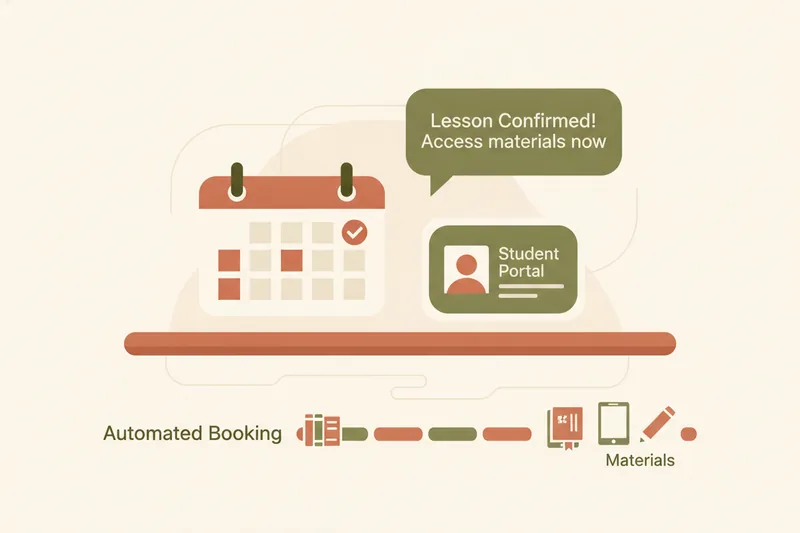
Automating lesson booking means letting a system handle the parts of scheduling that don't require your judgment — showing your real-time availability, accepting or holding a request, confirming the slot, and syncing it to your calendar — while you stay in control of decisions like whether to approve a reschedule or how many lessons a student has left. For an independent tutor, that shift alone can save hours a week and remove the guesswork of matching a booking to a paid lesson package.
What does it mean to automate lesson booking?
Booking automation is not a single feature — it's a chain of small handoffs that used to require a message back and forth. An online booking system shows students your open time slots pulled from a live calendar, lets them pick one, and confirms it without you typing a reply. Calendar sync means that once a slot is taken, it disappears from your availability everywhere it's shown — your calendar, the student's view, and any linked apps — so nobody can double-book it.
What automation does not replace is judgment. Deciding whether to accept a last-minute reschedule, whether a group lesson can absorb a new student, or how to handle a no-show is still yours to make. This is where tutoring scheduling software differs from a generic appointment tool: it's built around recurring lessons, packages, and a teacher-student relationship, not one-off appointments with strangers.
Why manual scheduling breaks down for tutors
Spreadsheets and chat threads work fine for a handful of students. They stop working once you're juggling ten, twenty, or more, each with a different lesson package, timezone, or recurring slot. This is exactly the gap Umvelo was built to close for language tutors who've outgrown ad hoc tools. The typical failure points are predictable:
- Double-booked slots — a student books directly in chat while you've already penciled someone else into that hour on your calendar.
- Lost reschedule requests — a message asking to move Tuesday's lesson gets buried under twenty other conversations.
- No link between booking and payment — you know a student booked a lesson, but not whether it's covered by their remaining lesson packages or needs a new payment.
- Manual tracking fatigue — every reschedule means updating a spreadsheet row, a calendar entry, and a chat reply separately, and mistakes compound over a term.
There's also a margin pressure worth naming: online tutoring sessions typically run 10-25% cheaper than in-person lessons across experience levels, which means the hours you spend on manual admin cut proportionally deeper into what's already a tighter rate. Automating the mechanical parts of scheduling isn't just convenience — it protects the time you're actually paid for.
The core pieces of a booking automation workflow
Before setting anything up, it helps to know the three components that any workable automation depends on. They apply whether you use a general scheduler or lesson-package-aware software.
Calendar sync and availability
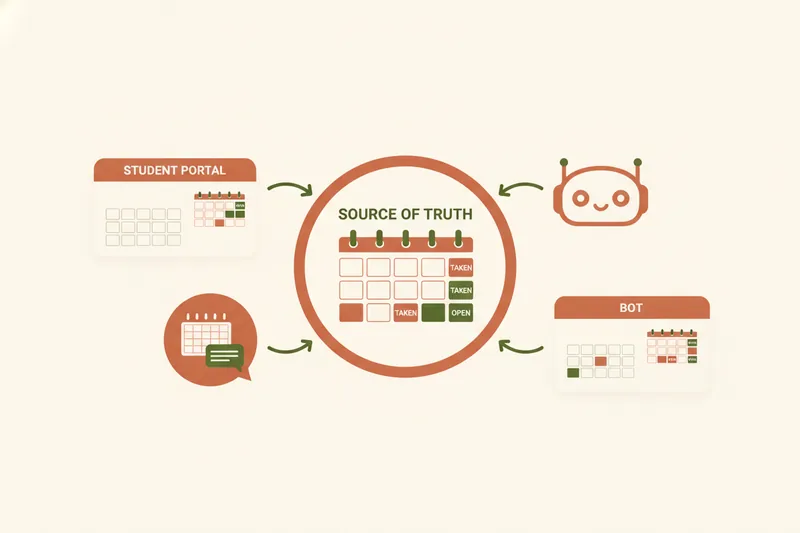
Your available hours need to live in one place that every booking channel reads from — your website, a student portal, or a chat bot. If a slot is taken anywhere, it has to vanish everywhere, instantly, or you're back to manual cross-checking.
Automated reminders
Reminders sent automatically ahead of a lesson — by email, in-app notification, or chat message — cut down on no-shows and last-minute "wait, is our lesson today?" messages, without you having to remember to send them yourself.
The reschedule and cancellation flow
This is the piece manual systems handle worst. A proper reschedule workflow lets a student request a new time from their own portal or chat, and lets you approve or decline it with one action, updating both calendars automatically once you do.
Step-by-step: setting up automated lesson booking
Step 1: Set up your schedule and availability
Start by defining recurring availability blocks rather than open-ended "message me" hours. Whether it's a dedicated calendar, a scheduling app, or a platform built for teaching, the goal is the same: one source of truth for when you're free.
Step 2: Give students a way to request or book a slot
This is usually a booking page or a mini-site where a student can see open times and either book instantly or send a request you approve. Some general tutoring tools go further than plain booking — Music Teacher's Helper, for example, gives students a login portal where they can also view assignments and log practice time, not just book a slot. That pattern — a portal that does more than scheduling — is worth looking for if you want one workflow instead of three.
Step 3: Let students accept, reschedule, or cancel themselves
Rather than routing every change through chat, a student portal lets a student submit a reschedule or cancellation request directly, which then waits for your approval instead of getting lost in a message thread.
Step 4: Attach materials to the confirmed lesson
Once a slot is locked in, materials for that specific lesson — a worksheet, a recording, homework — should be attached to it and visible only to that student, so nothing has to be re-sent by hand when the date approaches.
Automating reschedules, cancellations, and reminders without losing control
The mechanics matter here. A student requests to move Thursday's lesson to Friday; you get a notification with an accept action — one click approves it, updates your calendar, updates theirs, and closes the loop without a manual edit on either side. Cancellations work the same way, and depending on your policy, a cancelled slot can either release the lesson credit back to the student's balance or count it as used, but the platform should track that consistently rather than leaving it to memory.
Automated reminders sent a day or a few hours ahead reduce no-shows, but they also reduce the awkward "did you forget?" messages that eat into your actual teaching time. The point of automating this layer isn't to remove yourself from decisions — it's to remove the manual re-typing every decision used to require.
Tying booking automation to lesson packages and balances
This is where generic scheduling tools stop being enough. Booking a slot and paying for a lesson are two different events, and if your software only tracks the first, you're back to a spreadsheet for the second. A workflow built around lesson packages/credits keeps a running ledger of what's paid, what's planned, and what's left, so a confirmed booking automatically draws down the right balance instead of you cross-checking it by hand.
Payment tracking in this context means recording that a payment happened and attaching a receipt to it — not processing the transaction. In Umvelo's model, a student pays the teacher directly outside the platform, then marks the payment and uploads a receipt from their student portal; the teacher confirms it, and the ledger of paid, planned, and free lessons updates accordingly. That distinction matters for tutors who don't want a third party sitting between them and their students' money, while still wanting an accurate record of who owes what.
Automating booking through Telegram
Many tutors already run most of their student communication through chat apps, and a Telegram bot turns that habit into an automation channel instead of a manual one. Once connected, students can check their schedule, view materials, see their balance, and send a booking or reschedule request directly inside Telegram — no separate app to open. For a tutor whose students already default to chat, this closes the gap between "automated" and "actually used," since the request lands in a structured workflow instead of a message you have to interpret and act on by hand.
Best tools for automating lesson booking (comparison)
Guides comparing online tutoring platforms often split the market into tutor marketplaces and online course platforms — useful if you're choosing where to find students, but that split leaves out a third, more relevant category for an existing tutor: scheduling and lesson-management software built around your own student base.
Within that space, tools generally fall into two groups:
- General appointment schedulers — Calendly, Acuity Scheduling, SuperSaaS, and Bookeo let clients book open slots and often integrate payment processing to charge a card at booking. They're built for one-off appointments, not recurring lesson packages, so tracking a student's remaining credits usually means bolting on a spreadsheet anyway.
- Tutoring scheduling software — platforms built specifically for teaching link a booking to a lesson package balance from the start, track receipts instead of processing payments, and attach materials to the lesson itself. Umvelo falls in this second group, with a no-commission model: students pay teachers directly, and the platform only tracks the ledger, never touching the money.
The choice comes down to one question: do you need the tool to process payment, or do you need it to know how many lessons someone has left? Those are different jobs, and conflating them is usually what pushes tutors back to spreadsheets.
FAQs
Is there a free booking system for tutors? Some general schedulers offer free tiers — Calendly's free plan, for example, includes unlimited bookings on one calendar connection with no credit card required. They cover basic appointment booking but rarely track lesson packages or attach materials, so check whether "free" still leaves you managing balances manually.
Can AI help with lesson planning as part of this workflow? Some platforms now offer lesson-building tools that speed up preparing structured lessons, but planning content and automating booking are separate problems — automating your calendar doesn't automatically improve your lesson plans, and vice versa.
Does automating bookings mean the platform has to process payments? No. Booking automation and payment processing are independent. A platform can automate scheduling, reminders, and reschedules while only tracking that a payment happened — recording the receipt and updating a balance — without ever moving money itself.
Request access to see how Umvelo automates lesson booking, reschedules, and package tracking in one calm workspace.