Online Teaching Platforms: Marketplaces vs. Practice Tools

Search for "online teaching platforms" and you'll get a wall of sign-up pages for Outschool, Preply, and Udemy — all promising to match you with new students in exchange for a cut of what they pay. That's one real category of software. But if you already have a roster of students and just want a calm, professional way to schedule lessons, track what's owed, and hand over materials without losing a percentage of every payment, you're shopping in a second, mostly ignored category: practice-management tools built for tutors who don't need to be found — they need to be organized.
What Counts as an Online Teaching Platform?
An online teaching platform is any software that supports the operational side of tutoring or teaching: booking and rescheduling lessons, handling money or at least tracking it, sharing materials and homework, and keeping teacher and student in sync between sessions. Some platforms bundle all of this with student discovery — they actively bring you learners. Others assume you already have the students and focus purely on running the sessions well.
Three types of teachers typically end up comparing these tools: independent one-to-one tutors juggling several students' schedules and payments by hand, teachers running small groups who need materials tied to specific lessons rather than floating in a shared drive, and exam-prep instructors (IELTS, TOEFL, Cambridge) who need a clear, ongoing record of progress for students and often parents. For teachers in that last group especially, spreadsheets and chat threads stop scaling fast — which is the gap tools like Umvelo were built to close, giving a single dashboard for scheduling, balances, and lesson materials instead of five disconnected apps.
Marketplace Platforms vs. Independent Teaching Tools
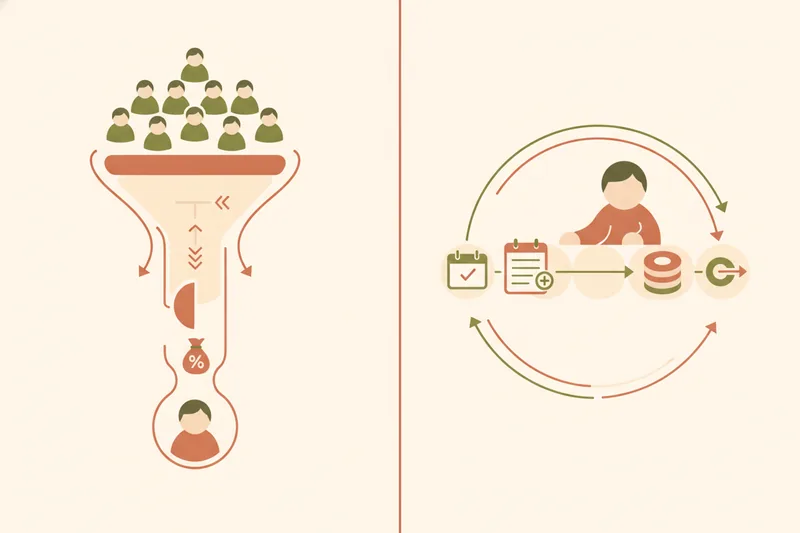
Most guides to this topic split the market into tutor marketplaces and online course platforms — Preply on one side, Udemy on the other. That split misses a category that matters more to a working tutor: whether the platform's job is to find you students or to help you run the practice you already have.
Marketplace commission is the fee a platform deducts from every lesson payment in exchange for listing you and routing student demand your way — it's baked into the business model, not an optional add-on. In return, your hourly pay/income is whatever's left after that cut, and your curriculum and schedule flexibility is often constrained by the platform's format, pricing tiers, or lesson-length rules.
A practice-management platform, by contrast, doesn't recruit students for you. It assumes you brought them, and its job is to make running lessons for them frictionless: calendar sync, a ledger of what's paid and owed, materials attached to the right lesson, and a portal so students aren't messaging you on three different apps. Because it isn't matching supply and demand, there's no structural reason for it to take a percentage of your lesson fee.
Best Online Teaching Platforms Compared
If you do want or need marketplace exposure — say, you're building a client base from zero — the major players differ meaningfully in audience and format.
Language-focused marketplaces (Preply, italki, Cambly, Lingoda)
Preply and italki connect independent language tutors with students searching by language and price point, with the platform taking a commission on each paid lesson. Cambly leans toward informal conversation practice rather than structured curriculum, with pay rates and lesson length largely set by the platform. Lingoda runs more like a subscription language school: students pay Lingoda for a class package, and teachers are scheduled and paid per class rather than building a direct, ongoing client relationship.
General course/class marketplaces (Outschool, Udemy, Superprof)
Outschool focuses on live, scheduled classes for school-age learners, useful for teachers building structured courses rather than 1:1 tutoring. Udemy is a marketplace for pre-recorded courses sold once and consumed asynchronously — not a fit if your work is live, ongoing tutoring. Superprof functions more like a tutor directory: it generates leads across many subjects but doesn't run your lessons once a student contacts you.
| Platform | Model | Commission | Best fit |
|---|---|---|---|
| Outschool | Marketplace, live scheduled classes | Platform commission per class | Teachers building structured group courses for young learners |
| Preply | Language tutor marketplace | Per-lesson commission | Tutors wanting the platform to supply new students |
| Udemy | Pre-recorded course marketplace | Revenue share on course sales | Instructors selling self-paced content, not live lessons |
| Cambly | Conversation-practice marketplace | Platform-set per-minute pay | Casual conversation tutors, not exam prep |
| italki | Language tutor marketplace | Per-lesson commission | Tutors seeking global student discovery |
| Lingoda | Subscription language school | Teacher paid per scheduled class | Teachers wanting fixed hours over their own client base |
| Superprof | Tutor listing/lead directory | Listing-based, lesson pricing set by tutor | Tutors across subjects wanting local or online leads |
None of these are wrong choices — they're built for a specific job: finding you students. The question is whether that's still the job you need done.
How Much Can You Earn Teaching Online?
Income on a marketplace is a function of two numbers: your lesson rate and the platform's commission. Whatever the exact structure on a given platform, the mechanism is the same — the platform sets or influences your price point, takes its cut off the top, and pays you the remainder. That's the trade for a steady stream of new student leads.
Teaching independently flips this: you negotiate your own rate with each student and, on a direct-pay independent tutoring model, keep the full amount they pay you. The tradeoff isn't financial risk to the platform — you still have to find and retain students yourself — but the per-lesson hourly pay/income you actually take home is higher for the same rate charged, because there's no marketplace commission sitting between the payment and your account.
Free vs. Paid Platforms: What You're Actually Paying For
Many marketplaces market themselves as free to join, which is technically true — the cost is embedded in the commission taken from every lesson, not charged as a subscription fee. "Free" and "no cost to you" aren't the same thing once you're teaching regularly.
Paid, subscription-based tools work the opposite way: you pay a flat fee for the software itself, and the platform has no financial stake in what a student pays you, so there's no structural reason to take a cut. This is what a no-commission model looks like in practice — the software charges for the tool, not for access to your own students' payments. It isn't unique to any one product either: some booking and scheduling tools, like SuperSaaS, explicitly charge no transaction fee or commission beyond what a payment processor itself takes, which is the same logic practice-management tools for tutors apply to lesson payments.
Platforms for Managing Your Own Students: Scheduling, Payments, and Materials
This is the category most searches for "online teaching platforms" skip past, but it's the one built for a teacher who already has a full or growing roster and wants to stop running it out of a notebook and three chat apps.
The core of this category is scheduling and rescheduling that stays in sync for both sides — a student requests a new time, the teacher accepts, and the calendar updates without a round of messages. Alongside it sits a lesson ledger: a running record of paid, planned, and free lessons, built around lesson packages rather than one-off bookings, with receipts and charge history attached so neither side has to remember who paid for what. Materials and homework are attached directly to the lesson they belong to, so a student opens their next session and finds the right file waiting instead of scrolling a shared drive.
A student portal ties this together on the learner's side — schedule, balance, materials, and grades in one place. Portals in this space typically go further than simple billing: showing assignments, logged practice, or upcoming sessions directly to the student, the way tools like Music Teacher's Helper do for music students. Some tutors extend this into Telegram bot integration, letting students check their balance or send a booking request without opening a separate app, and a mini-site/subdomain — a simple published page — lets a teacher collect new student requests without building a website from scratch.
Why "lessons only" mode matters for teachers who don't want to track money
Not every teacher wants their software touching payment records at all — some prefer to keep financial tracking entirely off-platform, or they teach a mix of paid and unpaid sessions (trial lessons, makeups, family favors) and don't want every one to imply a transaction. A lessons-only mode strips out balances and receipts entirely, keeping the tool to pure scheduling and materials, which matters because it lets a teacher choose exactly how much financial detail the platform holds — including none.
Crucially, none of this requires the platform to process or hold a student's payment. The student pays the teacher directly; the software's job is to track what happened afterward, not to sit in the middle of the transaction.
How to Choose the Right Platform for Your Teaching Style
The right category depends less on subject and more on where your students come from and how much administrative detail you're willing to track by hand.
-
Independent one-to-one tutor with an existing client base: a practice-management tool covers scheduling, balances, and materials without a commission eating into rates you've already set with your students.
-
Teacher running small groups: prioritize lesson-linked materials and a student portal, since group teaching multiplies the number of files, homework sets, and reschedule requests you're tracking at once.
-
Exam-prep instructor (IELTS/TOEFL/Cambridge): look for structured lesson-to-lesson material attachment and a ledger that keeps a clean record across a long-term package, since exam prep runs over months and both student and, often, parent want visibility into progress.
Decide on category first using three questions: are you actively trying to attract new students (marketplace) or serving ones you already teach (practice management)? How much commission are you willing to give up per lesson in exchange for lead generation? And how central are homework and materials to your teaching — a casual conversation tutor needs less structure here than an exam-prep instructor building a semester-long plan.
FAQ
What's the best platform for teachers who already have their own students? A practice-management tool rather than a marketplace — one built around scheduling, a lesson ledger, and lesson-attached materials, since you don't need student discovery, only better operations for the students you already teach.
Do practice-management tools take a commission? Not structurally. Since they aren't matching you with new students, they typically charge a flat subscription for the software instead of a percentage of your lesson payments, and some — like SuperSaaS in the broader booking-tool space — explicitly charge no transaction fee or commission at all.
Can I use a platform without it handling payments? Yes — a lessons-only mode keeps the tool focused on scheduling and materials while leaving all payment handling and negotiation directly between you and the student, with the platform only tracking the ledger if and when you choose to.
What happens to materials and homework when a lesson is rescheduled? On a well-built practice-management tool, materials stay attached to the lesson itself, not a fixed date — so when a lesson moves, its files and homework move with it, and the student portal reflects the new time automatically.
If you already have students and just want scheduling, balances, and materials to stop living in separate apps, see how Umvelo runs all three without taking a commission on your lessons — request access and get onboarded by a manager.