Tools for Teachers: Guide for Tutors & Language Businesses
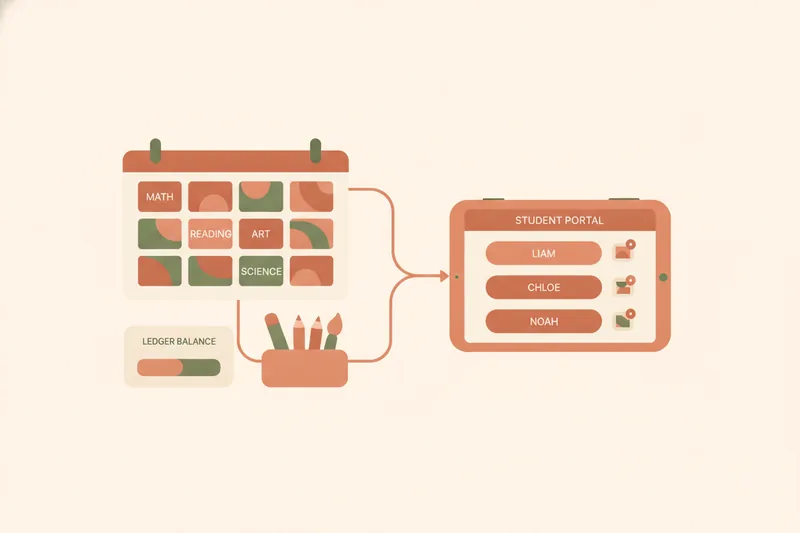
"Tools for teachers" covers everything from enterprise-grade student information systems (SIS) — the record-keeping software schools use for enrollment, attendance, and grades — to lightweight apps a single tutor runs from a phone. In between sit classroom management tools for behavior and engagement, lesson planning tools for building curriculum, professional development resources such as certification courses and teaching communities, and tutoring platforms, which are usually split into marketplaces that connect students with tutors and course platforms for prerecorded content, rather than forming one category of generic "management software". Knowing where you sit on this spectrum matters more than any single feature list. This is where a workspace like Umvelo comes in: built for the language tutor's own practice rather than a school system, it ties scheduling, lesson packages, and materials into one place instead of three separate apps.
Categories of Teacher Tools: Scheduling, Communication, Grading, and AI
Once you look past the SIS/classroom split, most teaching tools cluster into five practical categories: scheduling and attendance tools that handle calendars and no-shows; teacher communication tools for messaging with students or parents; grading tools for scoring and feedback; homework/materials tools for distributing and collecting work; and a fast-growing category, AI tools for teachers, aimed at speeding up planning and marking.
Some tools blur categories on purpose. Music Teacher's Helper, for instance, pairs billing with a student-facing login where learners view assignments and log practice time, not just an invoicing screen — a reminder that a "scheduling" or "billing" product often carries a portal underneath. For a lesson-based teaching business, that overlap is the point: a scheduling tool that never talks to your materials, or a payment tracker that ignores your calendar, still leaves you re-entering the same information twice. The categories are worth knowing by name, if only so you can tell which ones a given product actually replaces before you commit to it.
Classroom Teachers vs. Independent Language Tutors: Different Toolkits, Same Goals
Student information systems and classroom management tools solve school problems: rostering hundreds of students, tracking attendance for compliance, reporting grades to a district. An independent tutor or a small language-teaching business has none of that overhead, and almost none of those tools' features apply.
What matters instead is closer to what tutoring platforms offer — but even there, the fit varies. Some, like Varsity Tutors, operate as a service that assigns and manages students on the tutor's behalf, rather than a marketplace where the tutor builds their own profile, sets their own rate, and keeps the relationship. That distinction matters for pricing too: tutors running their own online practice typically charge 10–25% less than in-person tutoring across experience levels, which makes controlling your own scheduling and payment tracking — rather than paying a platform a cut to do it for you — a real part of the margin. A teacher running one-to-one lessons, small groups, or exam-prep cohorts needs a toolkit built around the lesson as the unit of work: who's booked, what they owe, what they're working on — not a gradebook designed for a 30-student classroom roster. The rest of this guide focuses on that toolkit.
Scheduling and Rescheduling Tools for Lesson-Based Teaching
For lesson-based teaching, a scheduling and attendance tool has to do more than display a calendar. It needs to handle reschedule requests without turning into a back-and-forth of messages: a student proposes a new time, the teacher accepts or declines, and the calendar updates for both sides without anyone copying dates by hand.
That's the core of Umvelo's scheduling: a teacher plans lessons on a calendar, and when a student sends a reschedule request from their own student portal — the personal view where they see their upcoming lessons, balance, and materials — the teacher accepts it and both calendars stay in sync automatically. For an independent tutor juggling a dozen students across time zones, that sync is the difference between a five-second decision and an evening spent reconciling three chat threads and a paper diary. Attendance matters less here as a compliance record and more as a trigger: a completed lesson should move a package balance forward, which is the piece most generic calendar apps don't touch at all.
Tracking Lesson Packages, Balances, and Receipts Without a Payment Processor
Most tutoring and appointment tools that touch money take a cut, or push you toward their own payment processor. That's a mismatch for teaching, where students usually pay the teacher directly — by bank transfer or cash — and the platform's job is just to keep score. A lesson package balance ledger tracks what's paid, what's planned against those paid lessons, and what's still free to book, so a ten-lesson package doesn't quietly become an accounting mystery by lesson six.
In Umvelo, after a student pays directly, they mark the payment in their portal and attach a receipt; the teacher confirms it, and the ledger updates what's paid, planned, and available — with no commission taken on money that never passes through the platform. That's not unheard of in adjacent software: some scheduling tools, like SuperSaaS, likewise don't add their own transaction fees on top of whatever the payment provider charges, though most still require a connected payment processor to work at all. Umvelo skips the processor entirely for teachers who don't want one; for lessons that aren't paid per package — a trial, a favor, a free makeup session — there's also a "lessons only" mode that tracks nothing but the schedule.
Sharing Materials and Homework Tied to Each Lesson
Materials and homework only work as a tool if they're attached to the lesson they belong to, not floating in a shared drive folder the student has to search. A homework/materials tool for tutoring should let a teacher attach files and links to a specific lesson, restrict visibility to the intended student or group, and let the student find it later without re-asking.
In Umvelo, materials attached to a lesson appear in that student's own portal alongside their schedule, balance, and grades, so a student preparing for a Cambridge exam sees the right worksheet next to the right lesson rather than a chat history of forwarded PDFs. Notifications flag new materials or grades as they're added. Because that portal also has Telegram bot integration, a teacher can let students book, check their balance, or get notified about new homework directly inside Telegram — useful for students who live in a messaging app more than an inbox and won't reliably check a separate web portal.
AI Tools for Teachers: What's Changing
AI tools for teachers have moved fastest in two areas: lesson planning, where generative tools draft outlines, quizzes, or leveled reading passages from a topic and target level; and grading, where automated scoring handles multiple-choice and short-answer work so a teacher's time goes to the feedback that actually needs a human read.
For language teaching specifically, the more mature use is drafting practice material and rough error patterns, not full assessment of open speaking or writing — that judgment still belongs to the teacher, especially in exam prep where a wrong grading heuristic costs a student real marks. Treat AI as a drafting assistant that sits upstream of your lesson plan and materials, not a replacement for the ledger, schedule, or portal that actually runs your teaching business day to day.
How to Choose the Right Tool for Your Teaching Setup
The right toolkit depends less on budget than on the shape of your practice. A one-to-one independent tutor mostly needs scheduling, a ledger, and materials — three jobs, ideally one tool. A teacher running small groups needs the same plus per-group visibility on materials. An exam-prep instructor needs structured lesson sequencing and progress visibility that a student, or a parent, can check without asking.
A teacher building a client base from scratch — including someone earning extra income tutoring alongside another job — needs a way for strangers to find them and leave a request, which is a different job from scheduling, closer to what a personal mini-site or landing page does: a public page where a prospective student sees availability and submits a request. Broader tutoring platforms that supply the students themselves are a separate choice again, with a different trade-off between reach and control over pricing and the relationship.
Checklist: what to look for before switching tools
- Does it handle reschedules without manual re-entry on both sides?
- Does it track lesson packages and balances, or only display a calendar?
- Can materials be attached to a specific lesson and shown only to the right student?
- Does it take a commission on payments, or just track them?
- Can a new student find and message you without a personal introduction?
- Does it match how you actually teach — 1:1, groups, or exam cohorts — rather than a generic classroom?
FAQ: Getting Started With an All-in-One Teaching Workspace
Is Umvelo self-serve? No — access isn't open sign-up. Teachers request access and are onboarded by a manager, which keeps setup calm rather than a maze of settings.
Does Umvelo process payments? No. Students pay teachers directly; Umvelo only tracks the ledger, balances, and receipts, with no commission taken.
Can I try it with just scheduling, no payment tracking? Yes, via "lessons only" mode.
Ready to stop juggling spreadsheets, payment apps, and chat threads? See how Umvelo brings scheduling, lesson-package balances, and materials into one calm workspace — request access to get onboarded.