Website Builder for Language Teachers: Beyond Design
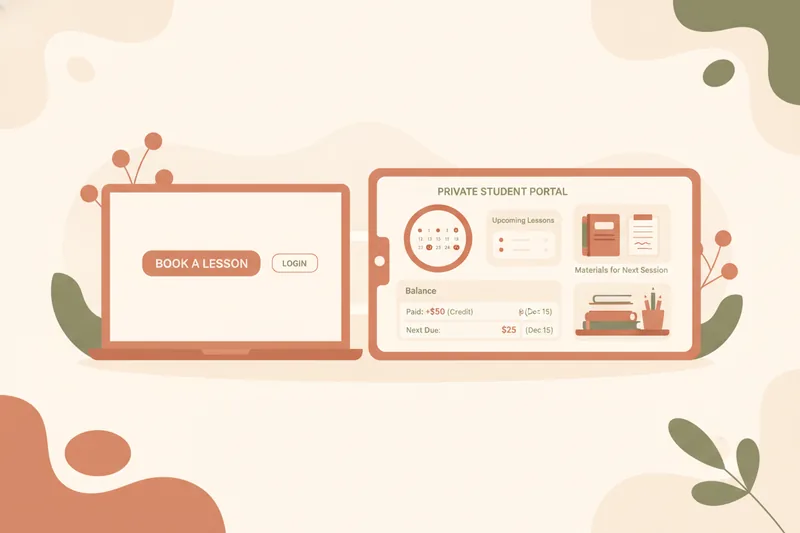
A website builder earns its place in a tutor's toolkit only when the page it produces is wired into the actual work of teaching — the booking calendar, the lesson package balance, the files a student needs before next Tuesday's session. A polished landing page that just funnels inquiries into an inbox solves the smallest part of the problem: it gets someone to find you, then hands the real coordination back to email, spreadsheets, and a separate scheduling app. The rest of this guide is about what to check for before you commit to a builder, not how pretty the templates look.
Website Builder vs. Page Builder: What a Tutor Site Actually Needs to Do
A website builder, in the plain sense, is a tool that lets you publish pages without writing code — text, images, a contact form, maybe a booking widget bolted on through a third-party plugin. That's a page builder: it's good at presentation and nothing more. For a teaching business, the distinction that matters is whether the site is a shop window or an operational front door.
A shop window tells a prospective student who you are and how to reach you. A front door does that and then lets an existing student actually do something — see their next lesson, check what they've paid for, download this week's worksheet — without a separate login somewhere else. Most generic builders, including the free ones bundled into portfolio-site services, stop at the shop window. The page looks finished, but every booking still arrives as an email you have to manually slot into a calendar, and every "where's my homework" message still comes through chat. For a tutor with a handful of regular students, that gap is tolerable. For anyone managing repeat bookings, lesson packages, or more than one class, it becomes the actual bottleneck.
The Operational Features a Tutor Site Needs Beyond Design
Three things separate a site that works for teaching from one that just looks like it does.
Scheduling and rescheduling
A booking form that only captures "I'd like a lesson" isn't scheduling — it's a request you still have to process by hand. What a tutor needs is a calendar the student can see and act on: requesting a reschedule, and the tutor accepting or declining it, with both sides looking at the same updated slot afterward. If the builder's calendar lives separately from the page that generated the booking, you've just added a second tool to keep in sync rather than removed one.
Student portal basics
A student portal is simply a private, logged-in view where an individual student sees only what applies to them — their own schedule, their own balance, their own materials — rather than a public page everyone shares. Without it, every one of those things has to be communicated manually, per student, every week.
Homework and materials delivery
Materials need to attach to a specific lesson and be visible only to the student or group that lesson belongs to, not sit in a shared folder link that anyone with the URL can open. A site that can publish a page but can't tie a worksheet to Tuesday's 4pm lesson still leaves you pasting links into chat.
Where a Static Site Falls Short Once You Have Repeat Students or Groups
A single static page is fine for a first inquiry. It stops being fine the moment a student becomes a repeat student. Repeat teaching means tracking what's already been paid for, how many lessons are left in a package, and what was covered last time — none of which a static page can hold, because it isn't aware of anything that happens after someone fills out the contact form.
Group lessons multiply the problem. A static site has no concept of a roster, so coordinating five students' availability, sending the same material to all of them, and tracking five separate balances all falls back to manual lists kept somewhere else entirely. At that point the "website" isn't managing anything — it's a brochure sitting next to the spreadsheet that's actually doing the work. The tell-tale sign is a teacher re-typing the same schedule or balance information in three places: the site, a calendar app, and a notes document, just to keep them roughly aligned.
Solo Portfolio Site vs. a Builder for Exam-Prep or Multi-Student Teaching
A single-page portfolio site answers one question well: who are you and how do people reach you. It has no structure for anything beyond that first contact, which is fine for a tutor who teaches occasional, unrelated one-off sessions.
Exam-prep teaching needs more structure than that. Students and parents expect to see a sequence — what's been covered, what's next, how progress is tracking toward a test date — not just a single inquiry form. Multi-student teaching adds a management layer on top: separate rosters, separate balances, separate material sets per group. Some tutoring-focused tools already build around this by giving each student their own login to see assignments and track their own progress rather than relying on the teacher to relay everything by hand. That's the functional line between a portfolio page and an actual teaching tool: whether each student has a private, individual view into their own lessons, or whether everyone's getting the same static page and the teacher is doing the rest manually.
Evaluating Free vs. Paid Options Against Your Teaching Needs
Free builder tiers are usually free because they're limited to the shop-window job — a page, a contact form, maybe basic branding. That's a reasonable trade for a tutor who just wants to be findable. It stops being a reasonable trade once you need scheduling, a student portal, or materials tied to specific lessons, because those are rarely included in a free tier at all.
Paid tiers earn their cost when they remove manual work rather than just adding design options. The clearest sign of that is whether the tool tracks lesson package balances as a running ledger — what's been paid, what's planned, what's still available — rather than leaving that accounting to a separate spreadsheet. A builder that only publishes a nicer page for the same price as a free one isn't worth the upgrade; one that replaces a tracking habit you've built in a notebook or spreadsheet usually is.
Choosing a Workspace That Connects Your Site to Real Teaching Operations
The category worth looking for isn't "website builder" at all — it's a teaching workspace that happens to include a bookable landing page as one part of a connected system, alongside scheduling, student portals, and materials. In that kind of setup, a new student finds you, submits a request from the published page, and lands directly in the same portal where lessons get booked and balances get tracked — not a separate inbox you then copy into another tool.
The balance-tracking part is worth checking specifically: a workspace built for tutors should track what's paid, planned, and available as a ledger, since teachers are typically paid directly by their students rather than through the platform itself. That keeps the tool in its proper lane — coordination and visibility, not a payment processor.
If you're ready to move beyond a static page, Umvelo brings scheduling, lesson packages, materials, and a student portal together with a bookable landing page, so a new inquiry and an existing student's lesson history live in the same place. Access goes through a short request-and-setup process rather than instant sign-up — worth requesting if you're past the point where a contact form is enough.