Scheduling Software for Tutors: What to Look For
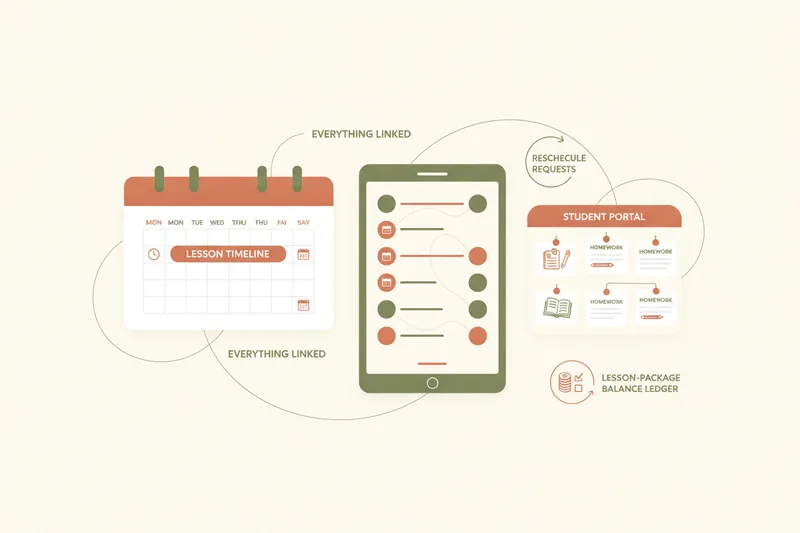
The right scheduling app for tutors is the one that treats reschedules, lesson-package balances, and homework delivery as part of the same workflow as booking a lesson slot — not as features bolted on afterward. A calendar can tell you when a lesson happens. It can't tell you whether a student still has lessons left on their package, whether last night's reschedule request has been answered, or where this week's materials live. That gap is what spreadsheets and chat threads are pressed into service to cover, and it's also the gap that separates a generic calendar tool from scheduling software built specifically for tutoring.
Why Spreadsheets and Generic Calendars Break Down for Tutors
A booking calendar on its own answers one question: when. For an independent tutor juggling a dozen students, that's rarely the hard part. The hard part is everything hanging off that slot — has this student paid for another block of lessons, did they ask to move Thursday's session, is the homework for next class actually attached anywhere a student can find it. Most tutors end up stitching the answer together from a calendar, a spreadsheet tracking lesson counts, and a scrolling chat thread full of "can we move to 4pm" messages. Nothing in that stack talks to anything else, so every reschedule means updating two calendars and hoping the spreadsheet gets touched too.
What separates tutor-specific scheduling software from generic calendar tools
Purpose-built tutor scheduling software is organized around the lesson, not just the time slot. That typically means:
- a booking calendar that also carries a reschedule workflow, not just an open/busy view
- a running lesson-package balance per student, so "lessons paid, used, and remaining" is never a manual count
- materials and homework attached directly to the lesson they belong to
- a student-facing portal so students check their own schedule and balance instead of asking
- structures suited to group classes and exam-prep tracking, not just one-to-one slots
Generic calendar tools and booking plugins typically handle the first item and stop there.
How Booking and Reschedule Requests Should Work
A reschedule request is the single most common source of admin friction in a tutoring practice, and it's worth being specific about how it should work. A student should be able to request a new time from their own view of the schedule, rather than texting the tutor and waiting. The tutor should see that request sitting against the original lesson — not as a disconnected message — and be able to accept or decline it with one action. Once accepted, the change needs to update everywhere at once: the tutor's calendar, the student's view, and any package balance the lesson draws from.
That last point is where calendar sync matters more than it sounds. If a tutor keeps a personal calendar and a separate booking calendar, every reschedule is a manual copy job, and copy jobs are exactly where double-bookings and missed lessons come from. A scheduling tool built for tutors keeps the tutor's and student's calendars as two views of one underlying lesson record, so accepting a reschedule request is the only step required — there's no second calendar to remember to update.
Tracking Lesson Packages and Payments Without Commission
Most tutors sell lessons in blocks — five, ten, twenty sessions — rather than billing one at a time, which means the schedule needs to know a balance, not just a date. A lesson-package balance should show, at a glance, how many lessons a student has paid for, how many are already booked against that package, and how many are still free to schedule. Without that, tutors either overbook a student who's run out of paid lessons or under-book one who has plenty left.
It's worth being precise about what "payment tracking" means here, because the term covers two very different things. Some scheduling platforms actually process the payment and take a cut or a flat fee for doing so — a few charge nothing beyond the card processor's own fee, but a fee only exists at all once a tool is moving money. A scheduling tool that only tracks a ledger sidesteps that question entirely: the student pays the tutor directly, through whatever method they already use, and then marks that payment and attaches proof of it in the app; the tutor confirms it, and the balance updates. No transaction ever passes through the software, so there's no commission to negotiate and no invoicing layer to manage inside the scheduling tool. For a tutor who wants visibility into what's paid and what's owed without handing a slice of every lesson to a payments provider, that distinction is the one to check before signing up with anything.
Connecting the Schedule to Student Portals and Homework
Once materials are tied to the calendar instead of sitting in a shared drive or an email thread, "where's the homework" stops being a question students need to ask. A lesson-linked materials setup means a file, a worksheet, or a link gets attached to a specific lesson, and only the students in that lesson can see it — useful for a tutor running several students or groups through different stages of the same course.
That's where a student portal earns its place. Portals in dedicated tutoring tools tend to give each student their own login where they can see their upcoming lessons, their remaining balance, and the materials attached to each session — not just a billing summary, but an actual working view of their own course. For the tutor, that portal is what absorbs the "can you resend that file" messages; for the student, it's one place to check rather than searching old emails before a lesson.
Scheduling for Groups and Exam-Prep Tutoring
A tutor running only one-to-one lessons can get by with a simpler calendar than one running groups or exam-prep cohorts. Group lesson scheduling needs to handle one slot with several students attached, each possibly on a different package balance, and materials that need to reach the whole group rather than one student at a time. A scheduling tool that only thinks in terms of one tutor and one student per slot forces group lessons into awkward workarounds — duplicate entries, or a separate spreadsheet just for groups.
Exam-prep tutoring, whether for IELTS, TOEFL, or Cambridge exams, adds a different pressure: structured, sequential lesson plans and visibility for parents or students into progress over the course, not just a list of past appointments. Rates for exam-prep specialists vary enormously, from around $50 an hour for less experienced tutors up to $200–$400 an hour or more for established specialists with a strong track record — and at the higher end, students and parents expect to see what that rate is buying in terms of structured progress, not just a calendar entry. Many exam-prep tutors also mix online and in-person sessions, since online lessons typically run 10–25% cheaper across experience levels; a schedule that can't hold both formats cleanly just adds friction on top of that mix.
Google Calendar vs. Dedicated Tutor Scheduling Software
Google Calendar, or a generic booking plugin layered on top of it, is a reasonable starting point for a tutor with a handful of students and no packages to track. It's free, it's familiar, and it does one thing — showing when you're busy — reliably. Some generic booking tools extend that with a usable free tier: Calendly's free plan, for instance, allows unlimited bookings on a single event type connected to one calendar, which covers a tutor just taking single, ad hoc bookings.
Where it stops covering the job is everywhere this guide has already pointed to. Generic calendar and booking tools have no concept of a lesson package balance, no reschedule-request workflow beyond "cancel and rebook," and no way to attach materials to a specific lesson for a specific student to see. A dedicated app becomes worth switching to once any of those gaps starts costing real time — usually around the point a tutor has enough students that package balances need a spreadsheet, or enough reschedules per week that manually syncing two calendars is a daily task rather than an occasional one.
A Checklist for Choosing Your Tutoring Scheduling Tool
The decision isn't about which tool has the most features — it's whether the tool's category of features matches what a tutoring practice actually runs on: bookings, reschedules, packages, and materials, connected to each other rather than living in separate places.
Moving off spreadsheets: what to look for before you switch
Before choosing, check whether a tool covers:
- a booking calendar with a built-in reschedule-request and accept/decline flow, not just open slots
- automatic sync between tutor and student views, so no lesson exists in two places that can drift apart
- a lesson-package balance that updates from confirmed payments, without the tool processing the payment itself
- materials and homework attached to individual lessons, visible only to the students in that lesson
- a student portal where students check their own schedule, balance, and materials
- support for group lessons and exam-prep sequencing, if that's part of the practice
A tool missing several of these isn't wrong for every tutor — someone with two students and no packages may be fine with a calendar and an honor system. But once reschedules, balances, and materials all need tracking at once, that's the point spreadsheets stop scaling and a dedicated scheduling workspace starts paying for itself in time, not just tidiness. Separate questions — like building a public booking page to attract new students, publishing a landing page, running live lessons with an in-lesson whiteboard, or how payments and invoicing get handled on the business side — are worth researching on their own once the scheduling foundation is settled.
FAQ: Tutor Scheduling Software
Is tutor scheduling software the same as a tutor marketplace?
No. Tutoring platforms are usually split between marketplaces and online course platforms, and a marketplace like Varsity Tutors works as a service that assigns students to tutors rather than a place where a tutor sets up their own profile and rates. Scheduling software for independent tutors is a different category again — it's a workspace for a tutor who already has their own students and needs to manage bookings, packages, and materials for them.
Can students book through Telegram?
In tools that support it, a tutor can connect their own Telegram bot so students view their schedule, balance, and materials, and send booking or reschedule requests, directly in Telegram instead of a separate app or email — useful for tutors whose students already communicate there by habit.
Are there free or low-cost options?
Generic calendar and booking tools often have a workable free tier for simple, single-calendar booking, but tools that add reschedule workflows, package balances, and student portals are generally paid products, and pricing structures vary by provider and plan. Since rates and tiers change, it's worth checking a provider's current published pricing directly rather than relying on a fixed figure.
If a familiar checklist like this one matches your own week — chasing reschedule replies, re-counting a student's remaining lessons, resending the same worksheet — it's a sign the setup has outgrown a spreadsheet and a shared calendar. Umvelo is built around that exact list: bookings, reschedules, lesson-package balances, and lesson-linked materials in one onboarded workspace. If that's where your practice is, it's worth requesting access and comparing it directly against what you're using today.